Jon Milley Creations

Flash Words: Building a Speed Reading Tool with Agentic AI

I recently stumbled across a short form video on YouTube that caught my attention. It showed a person reading at an incredible speed by having words flashed in front of them one by one. I was skeptical at first, but after trying it for a few minutes, I realized how much faster I could process information when my eyes weren’t constantly jumping around a page. I decided I wanted my own version of this tool, something minimalist and efficient, so I built Flash Words.

Why Speed Reading?

Most of us read at a pace that is limited by our eye movements. We skip back, we get distracted by sidebars, and our focus wanders. Speed reading techniques like the ones in this app help by forcing the brain to focus on a single point. It eliminates sub-vocalization (that little voice in your head that says each word) and stops your eyes from performing “regressions,” which is when you accidentally re-read the same line twice.

The Science in the App

To make this work, I implemented three specific techniques:

RSVP (Rapid Serial Visual Presentation): This is the core engine. It shows words in the same spot at a high frequency. Since your eyes don’t have to move from left to right, you can ramp up the speed significantly without losing comprehension.

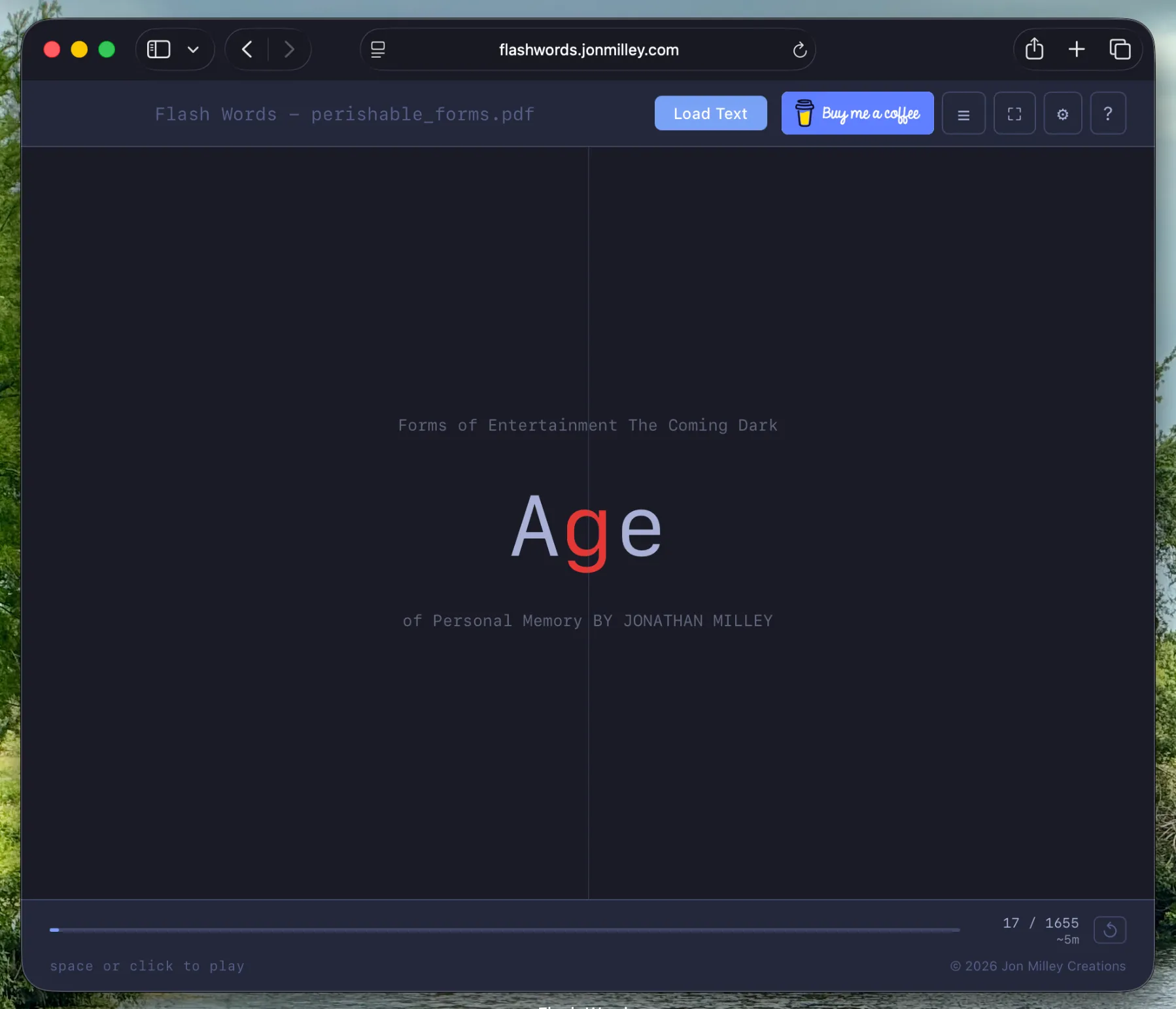
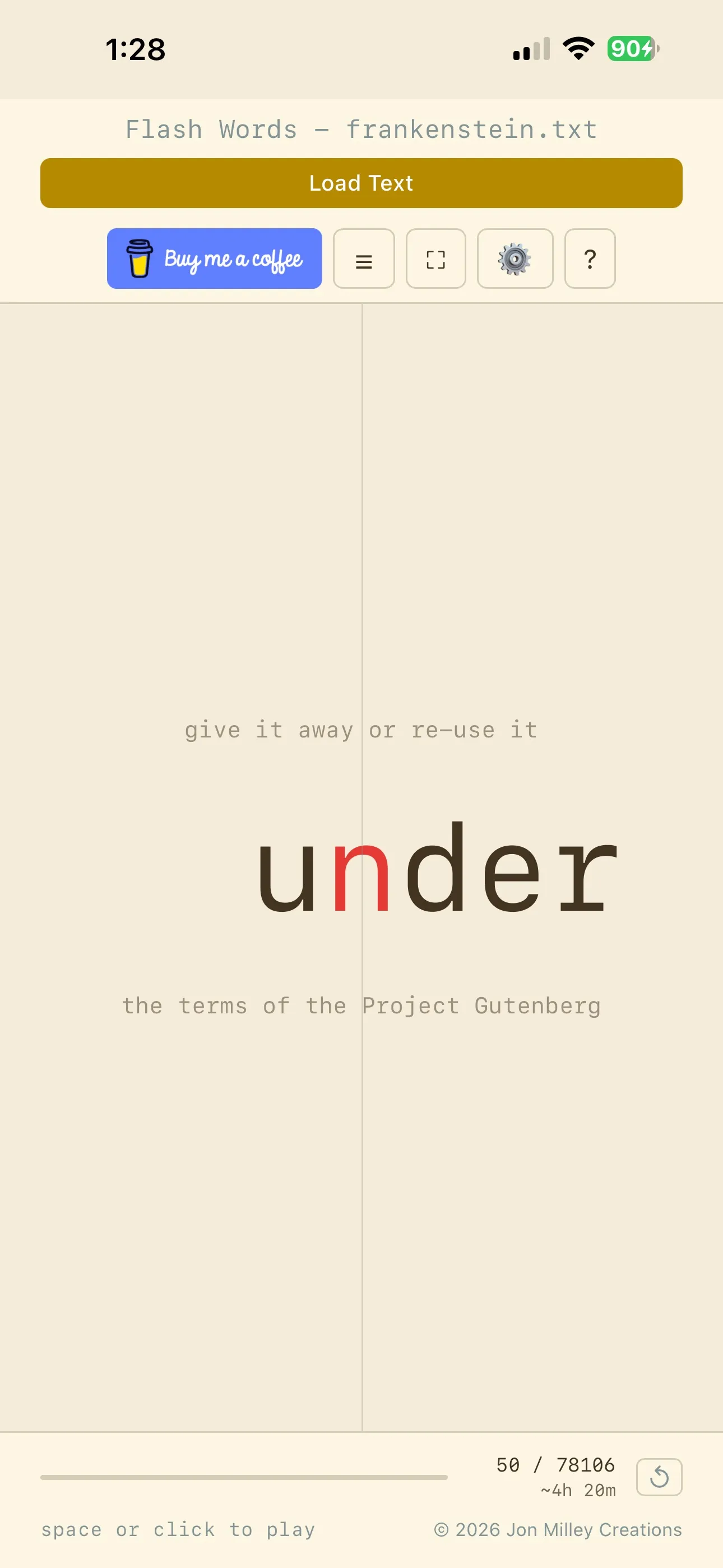
ORP (Optimal Recognition Point): This is that little red letter you see in the middle of the words. Research shows that our brains process a word faster if our eyes are fixed on a specific focal point (usually about 35 percent into the word). By highlighting this point, the app helps your brain “snap” to the word instantly.

Bionic Reading: This mode bolds the first few letters of every word. It acts as a guide for the eye, letting the brain complete the rest of the word based on context and memory. It is surprisingly effective for staying focused during long sessions.

Main reading interface showing ORP mode

Built in an Evening with Agentic AI

The most interesting part of this project was the development process. I built the entire application in a single evening using Agentic AI. Instead of just writing code myself or copying snippets, I worked with an AI agent that could understand the high level goals and perform complex refactors autonomously.

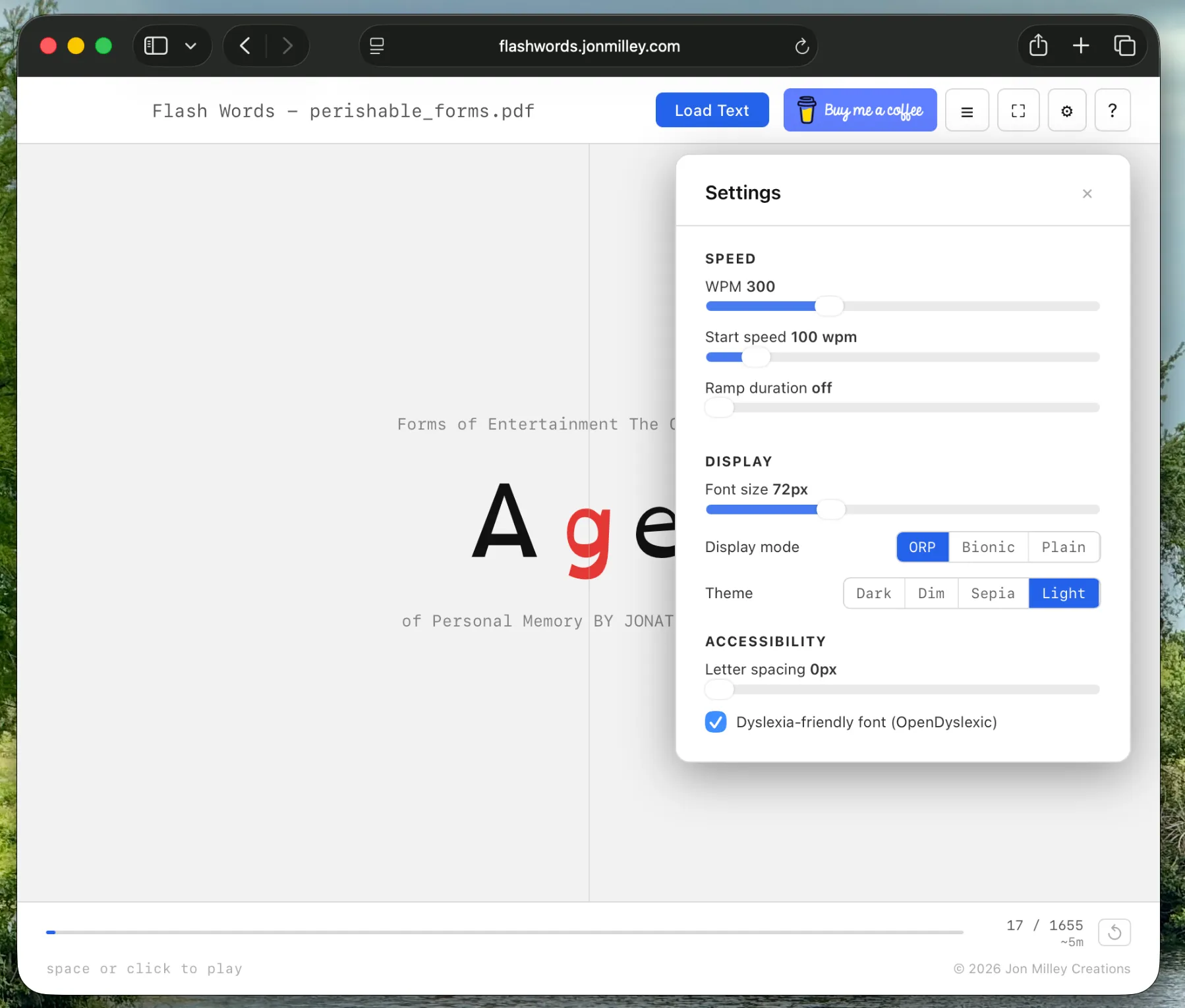
We started with a basic React structure and quickly realized the settings menu was becoming too cluttered. In one session, I had the agent refactor the entire settings modal into a responsive drawer that slides out on the side. This allowed me to keep the text visible in the background so I could see exactly how font changes or letter spacing adjustments looked in real time.

The responsive settings drawer on desktop

Research and Accessibility

One of the highlights was using the AI to research ways to make the app better for people with dyslexia. The agent found studies on the OpenDyslexic font and the benefits of specific color overlays. Based on that research, we added a dyslexia-friendly mode, adjustable letter spacing to reduce visual crowding, and low-contrast themes like “Sepia” and “Dim” to reduce eye strain.

We also expanded the app to handle more than just plain text. We integrated libraries to parse PDFs, Word documents, and even EPUB files. Each of these libraries is quite heavy, so the agent implemented lazy loading. This means the code for parsing a PDF only downloads to your browser if you actually try to open a PDF, keeping the app fast and lightweight.

Give it a try

The final result is a Progressive Web App (PWA) that works offline and saves your progress automatically. You can load a book, set your target speed, and let the ramp-up feature slowly bring you up to 500 or 600 words per minute.

You can try the application here: https://flashwords.jonmilley.com

Mobile view of the app in sepia mode

Introducing QuiltForge: Where Software Meets Stitches

As I mentioned in my last post, I’ve taken up quilting for the first time. Like most beginners, I quickly discovered that quilting is far more than cutting fabric and sewing it back together. There is colour theory, geometry, fabric estimation, cutting precision, and a surprising amount of planning before a single stitch is made. As someone who has spent years writing software, my instinct was immediate: there has to be a better way to plan all of this digitally.

So I built one.

QuiltForge is a web-based quilt design application I have been building in my spare time. It is free to use, runs entirely in your browser, and is designed to help quilters (especially those just starting out like me) plan their projects from start to finish before touching a single piece of fabric.


What QuiltForge Can Do So Far

Fabric Library

You can upload photos of your fabrics and organise them in a personal library. Add tags, give them names, and QuiltForge will automatically extract a dominant colour from each one. Your fabrics then appear as swatches throughout the rest of the app, so your designs always reflect what you actually have on hand.

Block Designer

This is where the fun begins. QuiltForge ships with a growing library of classic quilt block templates including Half-Square Triangles, Quarter-Square Triangles, Flying Geese, Pinwheels, Ohio Stars, Log Cabins, Churn Dash, Sawtooth Stars, and more. Select a template, assign your fabrics to each shape, and watch it come to life with your actual fabric textures.

There is also a free-form drawing mode for when you want to design something entirely from scratch.

Quilt Layout Designer

Once you have designed your blocks, you can arrange them into a full quilt layout. Set your grid dimensions, drag blocks into cells, and mix and match them across the quilt. Each cell can be individually rotated or flipped. You can also add sashing, multiple borders, and binding, each with their own fabric assignments.

The layout gives you a live preview of your finished quilt with accurate proportions and your real fabric textures applied.

Fabric Estimator

One of the trickiest parts of starting a quilt is figuring out how much fabric to buy. QuiltForge calculates yardage requirements for every fabric in your quilt automatically, including seam allowances, a 15% waste factor, and the standard bolt width. It rounds up to the nearest eighth of a yard so you always have enough.

Cutting Calculator

A standalone tool that takes a finished piece size and tells you exactly what to cut, with seam allowances included. It covers the most common units: squares, half-square triangles, quarter-square triangles, flying geese, and more.

When you are ready to get to the sewing room, QuiltForge can generate a print-ready summary of your project including a quilt layout diagram, block diagrams with piece labels, a full cutting list organised by fabric, and a fabric requirements table. You can also export the quilt layout as a PNG image.


A Work in Progress

I want to be upfront: QuiltForge is very much a work in progress. I am still early in both my quilting journey and the development of this tool. Some features are rough around the edges, a few are incomplete, and the design will keep evolving as I learn more about what quilters actually need.

I am building this alongside my own learning. Every time I start a new project and run into a planning problem, it becomes a feature on my list.


Free to Use, Always

QuiltForge is and will remain free to use. There is no account required, no subscription, and all your data stays in your browser. My goal is simply to make quilt planning easier and more enjoyable, and I hope it can be useful to others who are just starting out the way I am.


I Would Love Your Feedback

If you give QuiltForge a try, I would genuinely love to hear what you think. What works well? What is confusing? What feature would make your planning life easier? Whether you are a brand new quilter or someone with decades of experience, your perspective would help shape where this goes next.

You can find the app at quiltforge.jonmilley.com and send feedback or feature requests my way at https://x.com/jonmilley.

Happy quilting!

Starting My Quilting Journey at the Anna Templeton Centre

Starting My Quilting Journey at the Anna Templeton Centre

There’s something about picking up a craft that connects you to the people who came before you. For me, quilting is that craft, and today I took my first real steps into it.

I enrolled in Quilting: Next Level at the Anna Templeton Centre for Craft, Art & Design in St. John’s. The centre is tucked into a beautiful historic building on Duckworth Street, a not-for-profit that’s been championing craft in Newfoundland for years. I’d been there before. I took an earlier course with the same instructor where we made a tote bag and a zippered pouch, and the warm, encouraging atmosphere is a big part of why I came back.


Day One: Strips, Cuts, and the 9-Patch Block

Today’s class was all about foundations. We started by cutting our fabric into strips, then sewing those strips together into a strip set. Strip piecing is wonderfully efficient. Rather than cutting and sewing individual squares one at a time, you assemble long strips first and then crosscut them into ready-made segments. It feels almost like a cheat code once you see it in action.

From those segments we’re building toward a 9-patch block, nine squares of fabric arranged in a three-by-three grid, alternating between two fabrics. It’s one of the most classic blocks in quilting, and for good reason: it teaches you to keep seams straight, press accurately, and nest your seams so the intersections lie flat. Get comfortable with the 9-patch and you have a foundation you can build almost anything from.

One thing I appreciated: we learned both ways to make a 9-patch. The strip set method is the efficient, production-friendly approach, great when you’re making many blocks. But we also cut and sewed individual squares by hand, which is slower and more deliberate. The instructor designed it this way intentionally, so we’d understand not just how to do it, but why each method exists and when to reach for which one.

I left class with my strips cut, sewn, and ready for the next step. It’s a small thing, but holding those pieces and seeing them actually align was satisfying in a way I didn’t quite expect.

My 9-patch squares laid out on the cutting mat

Here’s what the instructor’s finished sample quilt looks like, and where we’re headed:

Instructor's sample quilt showing the finished 9-patch pattern


Why This Matters to Me

I’m not taking this course just to learn a new hobby. There are two projects waiting for me on the other side of this learning curve, and both of them carry a weight that’s hard to put into words.

My Mother’s Quilt

My late mother nearly finished a quilt. It’s a classic block pattern with a border, and she got so close. It just needs to be quilted. For years it’s sat waiting, almost done, a project she never got to complete.

I want to finish it for her. Learning to quilt properly, understanding tension and batting and how to move a quilt through a machine or by hand, means I’ll be able to do it right. It deserves to be done right.

My Grandmother’s Embroidery

My grandmother was a skilled hand embroiderer, and before she passed she created a collection of pieces depicting Newfoundland scenes: lighthouses, fishing boats, puffins, moose, the landscapes and wildlife of this place we call home. They are beautiful, and they deserve to be seen.

My plan is to incorporate them directly as quilt blocks, setting her embroideries into a larger quilt design. Before they go in, I’ll interface them, a layer of fusible backing that stabilizes the fabric and protects all that careful hand stitching from the stress of being worked into a quilt. It’s a way of honouring the work she put into each piece while giving them a new life as something you can wrap around yourself on a cold Newfoundland evening.

One of my grandmother's hand embroidered Newfoundland scenes


Looking Forward

I’m excited about where this goes. Not just for the technique, though I do want to feel genuinely confident taking on my own projects, but for what’s possible once I have the skills. A quilt made from my grandmother’s embroidered puffins and lighthouses. My mother’s quilt, finally finished.

There’s a long tradition of quilting in Newfoundland, of women sitting together and turning scraps of fabric into something lasting and beautiful and warm. I feel like I’m just starting to understand what that means.

More updates as the course progresses.